

Over the last couple of years, I’ve started using AI (LLM's) to help with my WordPress plugins. At first it was mostly small things: fixing a bug, adding a feature, or generating a function I didn’t feel like writing from scratch. The results were surprisingly good, and it quickly became part of my workflow.
But I also noticed something else. If you simply copy the code an LLM generates and drop it into a plugin, problems start to show up quickly. Structure becomes inconsistent, standards get ignored, and small security issues like missing escaping or sanitisation creep in. I often found myself spending more time fixing the AI’s small mistakes than it would have taken to write the code myself.
What eventually worked for me was not a better prompt, but a better workflow. Instead of asking an LLM to build a plugin, I give it a clear structure, rules, and small tasks. In this article I’ll share the approach I now use to build WordPress plugins with LLMs without creating a mess.
The “Prompt-and-Pray” Trap
When people first start using AI to build WordPress plugins, the workflow usually looks something like this. They open ChatGPT or Cursor, describe the plugin they want, copy the generated code into a file, and activate it. The result often looks impressive at first because the AI produces a complete plugin structure almost instantly.
The problem is that this approach treats the AI like a senior developer who understands the architecture of your plugin. In reality, the AI is just generating code based on patterns it has seen before. Without clear structure or constraints, the result often leads to messy file organisation, inconsistent standards, and subtle security problems that slowly turn into technical debt.
But after working this way for a while, the problems start to appear. The plugin technically works, yet the structure rarely makes sense. Files appear in unexpected places, logic ends up inside the main plugin file, and important details like escaping or sanitisation are inconsistent. Nothing breaks immediately, but the code becomes harder to maintain with every change.
I ran into this several times while adding features to my own plugins. The AI could generate working code quickly, but I often spent more time reorganising the files and fixing small mistakes than I would have spent writing the feature myself. Eventually it became clear that the issue was not the AI itself, but the way I was using it.
The turning point came when I stopped asking AI to build entire plugins and started giving it a structured environment instead. Rather than letting the AI invent its own architecture every time, I began with a predefined plugin foundation and asked the AI to extend it one piece at a time.
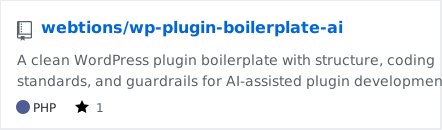
To make this workflow easier, I created a small starter repository that I now use as the base for AI-assisted plugin development:
The repository provides a clean plugin structure, development tooling, and a few simple rules that guide how new code should be added. Once the structure already exists, the AI no longer has to guess where things belong. Instead, it simply extends the architecture that is already there.
Starting with a Proper Plugin Foundation
Once I realised the problem was the workflow, the next step was to create a foundation that AI could safely work inside. Instead of letting the AI decide how a plugin should be structured every time, I started with a predefined architecture and asked the AI to extend it. This simple change removed a lot of the chaos that usually appears in AI-generated code.
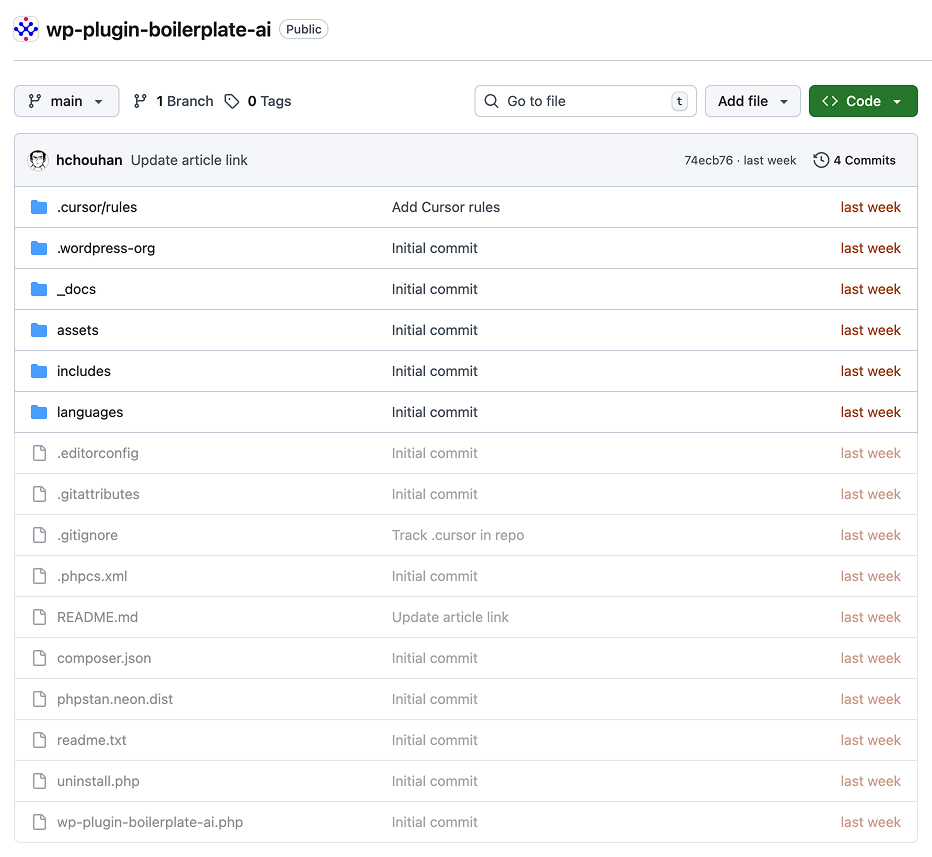
The starter structure I now use is available in the wp-plugin-boilerplate-ai repository. The goal of this project is not to provide a complex plugin template, but to give both developers and AI tools a predictable map of where things belong. When a plugin already has a clear structure, the AI no longer needs to invent one.
One of the most common problems with AI-generated plugins is that everything ends up in a single file. The AI will happily place hooks, helper functions, business logic, and sometimes even HTML inside the main plugin file. It works at first, but the file quickly grows into something that is difficult to maintain or extend.
The boilerplate solves this by separating responsibilities into clear folders from the beginning.
plugin-root
├── includes/
├── assets/
│   ├── css/
│   └── js/
├── languages/
└── main plugin file
With this structure in place, the main plugin file stays small and focused. Its job is simply to load the plugin and bootstrap the core functionality, while the actual logic lives inside the includes directory.
This simple separation removes a lot of guesswork for the AI. If I ask the AI to add a feature, it already knows where the logic should go instead of placing everything inside the main plugin file.
Another important part of the foundation is the development tooling included in the repository. The boilerplate uses Composer to manage tools like PHP_CodeSniffer, WordPress Coding Standards, and PHPStan.
The goal here is not to teach Composer or modern PHP architecture. These tools simply exist as part of the foundation so the plugin remains consistent and maintainable as it grows.
When AI generates code inside this environment, those tools automatically help enforce standards and catch mistakes. The AI writes the code, but the tooling ensures that the result still follows WordPress best practices.
The tooling is defined in composer.json

"require-dev": {
	"dealerdirect/phpcodesniffer-composer-installer": "^1.0",
	"php-stubs/wordpress-stubs": "^6.0",
	"phpstan/extension-installer": "^1.4",
	"phpstan/phpstan": "^1.10",
	"szepeviktor/phpstan-wordpress": "^1.3",
	"wp-coding-standards/wpcs": "^3.0"
},
Once this foundation exists, the plugin effectively becomes a map that the AI can follow. Instead of inventing files and structure every time you add a feature, the AI simply extends the architecture that is already there.
This small shift changes the role of AI completely. Instead of behaving like an unpredictable code generator, it becomes a fast assistant that works within your system.
Teaching the AI Your Rules
Having a clean plugin structure already solves part of the problem, but it is still not enough on its own. AI tools will happily ignore that structure if they are not given clear instructions. Left on their own, they often invent new folders, move logic into unexpected places, or generate files that do not match the architecture of the project.
The solution is simple: teach the AI the rules of the project before asking it to write code.
In the wp-plugin-boilerplate-ai repository, this is done through a small set of rule files inside the .cursor directory. These files describe how the plugin is structured and how new features should be added. Instead of guessing how the project works, the AI can read these rules and understand where different types of code belong.
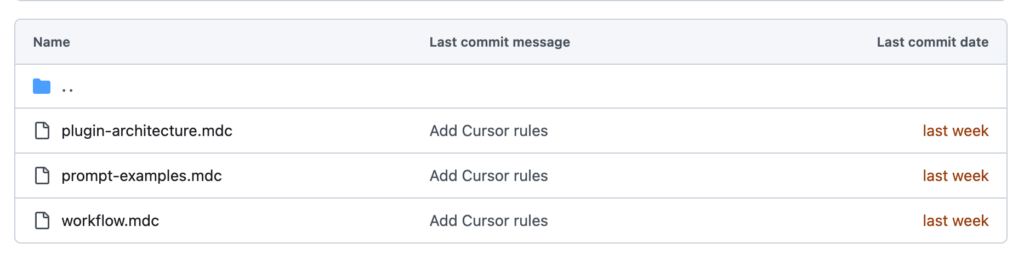
These rule files explain the basic architecture of the plugin. For example, they make it clear that the main plugin file should stay small and only handle bootstrapping, while the actual functionality lives inside the includes directory. They also describe where scripts and styles should be placed and how new features should be organised.
Once the AI receives this context, its behaviour changes noticeably. Instead of inventing a new structure every time you ask for a feature, it begins working within the architecture that already exists in the project.
Note
Even if you are not using Cursor, you can achieve the same result by pasting these rules into your initial prompt or by using system instructions in other AI tools. The important idea is not the tool itself, but giving the AI clear architectural guidelines before it starts generating code.
Excerpt from plugin-architecture.mdc:
## Main plugin file

- Bootstrap only. No business logic.

## includes/

- All PHP logic lives here.

## Adding new features

- Add a new class in `includes/`
This approach turns AI-assisted development into a predictable workflow. The AI is still generating the code, but it is doing so within clear boundaries that keep the plugin organised and maintainable.
Once the structure and rules are in place, the AI becomes much easier to work with. Instead of constantly correcting the architecture it creates, you can focus on building features while the AI extends the system that already exists.
In the next section, we will look at the second layer of protection in this workflow: automated tools that enforce WordPress coding standards and catch the small mistakes AI often overlooks.
Enforcing Standards with PHPCS and WPCS
Even with a good structure and clear rules, AI-generated code will still miss small details from time to time. Most of these issues are not dramatic errors. They are small inconsistencies that slowly accumulate and make the code harder to maintain.
Common examples include missing escaping functions, inconsistent naming, or forgetting to sanitise input properly. The code may still work, but it no longer follows WordPress standards.
This is where automated tooling becomes extremely useful.
The wp-plugin-boilerplate-ai repository includes PHP_CodeSniffer configured with WordPress Coding Standards (WPCS). The configuration lives in the .phpcs.xml file in the repository and ensures the code follows WordPress development guidelines.
Instead of manually reviewing every line of AI-generated code, you can run PHPCS and immediately see where the code violates WordPress standards.
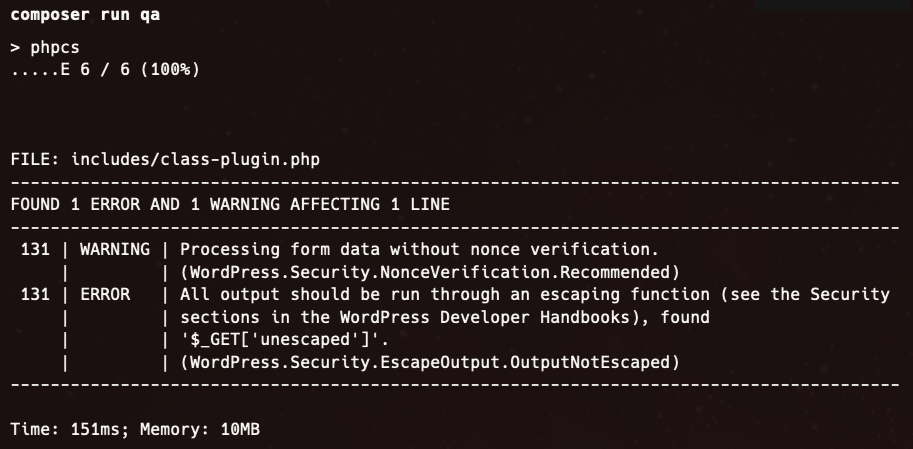
When the AI generates new code, these tools immediately act as a safety net. If something does not follow WordPress standards, PHPCS will flag it. This makes it much easier to correct small mistakes before they become part of the codebase.
Another benefit of this approach is consistency. As the plugin grows, the coding standards remain enforced automatically. Whether the code is written by a developer or generated by AI, it still needs to pass the same checks.
The boilerplate also includes PHPStan, which adds another layer of analysis by detecting potential type errors and structural issues in the code.
Example phpstan.neon configuration:
parameters:
    level: 5

    paths:
        - .

    excludePaths:
        - vendor
        - node_modules
        - assets
Together, these tools form a second layer of guardrails for AI-assisted development. The project structure guides where code should live, while PHPCS and PHPStan ensure that the code itself follows professional standards.
This combination allows you to take advantage of the speed of AI without sacrificing the quality and consistency expected in WordPress plugins.
Working in Small, Modular Pieces
Another mistake people often make when using AI for plugin development is asking it to generate too much at once. It may feel efficient to request a complete plugin with multiple features, but the results are rarely clean or maintainable.
When AI is asked to generate an entire plugin, it tends to mix responsibilities together. Hooks, logic, helper functions, and sometimes even HTML end up scattered across several files or bundled into a single large file. The plugin might technically work, but the structure quickly becomes difficult to understand or extend.
A much more reliable approach is to generate code in small, focused pieces.
Instead of asking the AI to create a full plugin, ask it for specific components. For example, you might ask it to create a class that registers a hook, a function that sanitises input, or a class responsible for handling a settings page.
Because the wp-plugin-boilerplate-ai repository already provides a clear structure, these pieces have an obvious place in the project. Logic can live inside the includes/ directory, while scripts and styles remain inside the assets folder. The AI simply extends the existing architecture instead of inventing its own.
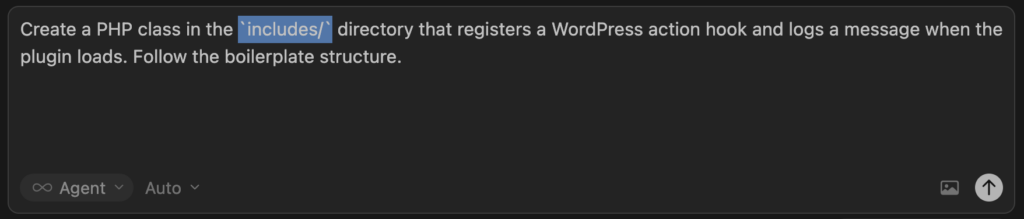
For example, you might ask the AI something like this:
Create a PHP class inside the `includes/` directory that registers
a WordPress action hook and logs a message when the plugin loads.
Follow the structure used in the boilerplate repository.
This type of request gives the AI both a clear task and clear boundaries. The code it generates becomes easier to review, easier to test, and easier to integrate into the plugin.
Working this way also makes debugging much simpler. If something goes wrong, you are dealing with a small piece of functionality rather than an entire plugin generated in one step.
Over time the plugin grows through small, predictable additions. Each new feature fits into the existing structure, and the architecture remains consistent.
This incremental approach is one of the most effective ways to use AI in development. Instead of relying on it to produce a complete solution in a single prompt, you guide it step by step as the plugin evolves.
In the final section, we will look at the last step of the workflow: manually reviewing the generated code to ensure it follows WordPress best practices for escaping, sanitisation, and security.
The Final Step: Testing, Escaping, and Sanitization
Even with a clean structure, clear AI rules, and tools like PHPCS and PHPStan, one step should never be skipped: a quick manual review.
AI is good at producing working code, but it often misses small security details. The most common issues are missing sanitization for input and missing escaping when outputting data.
Before committing the code, take a moment to review how data flows through the plugin.
- Is user input sanitized before being stored or processed?
- Is output properly escaped when displayed?
- Do the hooks behave as expected?
These checks take only a few minutes, but they make the difference between code that simply works and code that is safe to run on a live WordPress site.
AI can speed up development, but the developer is still responsible for the final quality of the plugin. Once you adopt this workflow, AI stops being a source of messy code and becomes a genuinely useful development assistant.
The Workflow in Practice
After experimenting with different approaches, this is the workflow I now follow when building a plugin with LLM assistance.
- Start with a structured plugin foundation Begin with a predefined architecture instead of letting the AI invent the plugin structure.
- Give the AI clear architectural rules Provide instructions about where logic, assets, and new features should live in the project.
- Use automated tooling Run PHPCS with WordPress Coding Standards and static analysis tools like PHPStan to catch mistakes early.
- Generate features in small pieces Ask the AI for specific classes, hooks, or functions instead of requesting a full plugin.
- Review the generated code manually Check sanitization, escaping, and data handling before committing the code.
This approach keeps the AI focused on writing code while the developer remains responsible for the structure, quality, and security of the plugin.
LLMs are useful when building WordPress plugins, but they work best as assistants, not developers. They can write code quickly, but they don’t understand your project or architecture.
What made the biggest difference for me was changing the workflow. I don’t ask AI to build plugins. I give it a foundation, clear rules, and small tasks. The AI writes code, tools enforce standards, and I stay in control.
In the next posts, I’ll break down how I structure plugin files, write better prompts, and use tools like PHPCS and PHPStan to keep everything clean.
Leave a Reply